Consider objects distinct
You can specify how fields of objects are aggregated. On the one hand, you can aggregate the fields of objects normally, whereby, the field value is considered for every occurrence of the object. On the other hand, you can consider the objects distinct and only consider the field value for one occurrence of every object. In that case, an unique object is only considered once, regardless of whether the object appears more than once.
The example is based on the data of the chapter Source data example.
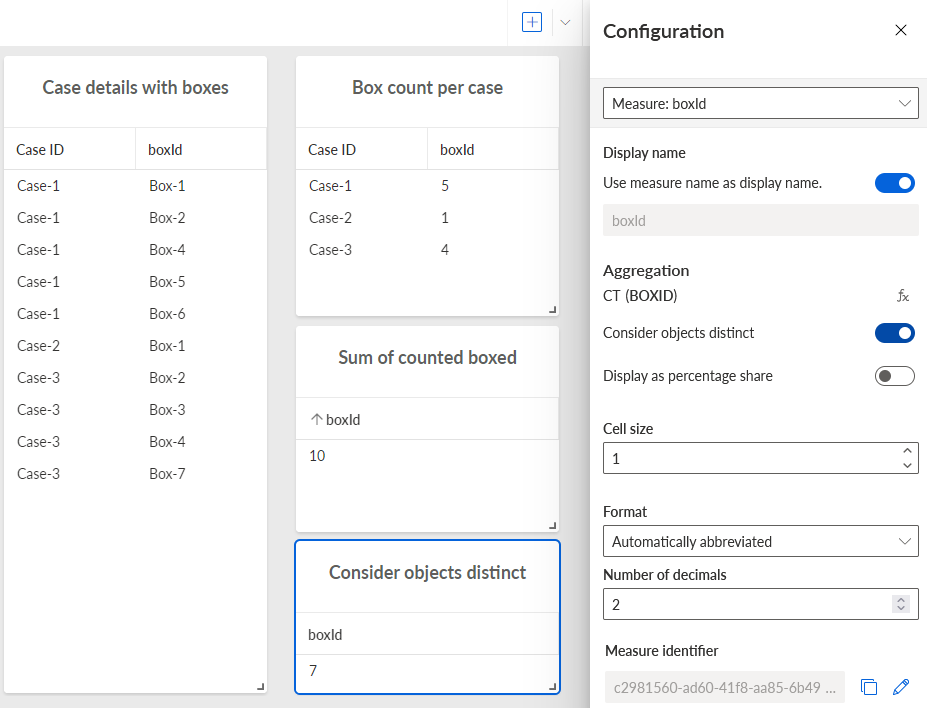
The Case details with boxes table shows that there are seven different delivery boxes (Box-1 to Box-7) that appear in three cases. Whereby, some boxes appear in multiple cases, for example, Box-1 appears in Case-1 and Case-2.
The Box count per case table shows the number of boxes counted per case. The table Sum of counted boxes table shows the sum of boxes counted per case, that is 10.
The Consider objects distinct table shows the sum of boxes counted regardless of whether they appear in more than one case, that is, there are actually 7 distinct boxes.
Select a component in the app, for example, a table.
Assign the criteria, that is dimensions and measures, to the selected component.
Note that the Consider objects distinct option is available only if the assigned criteria are part of the same object. In this case the option is enabled by default. The option is not available for all aggregation types.
In the Configuration, move the mouse pointer over a measure and click
 Configure. The Configuration panel of the selected measure opens.
Disable the Consider objects distinct option if you want to aggregate the fields of objects for every occurrence of the object.
You specified how fields of objects are aggregated.