Enhance process data
You can add more data to enhance the process data of a data set, for example, to lookup names for technical identifiers in the activity table. To enhance the process data, you must add one or more data tables, and link the tables in the data set with each other. Enhancement tables must contain appropriate data, including specific columns that you can use to link the tables. These columns are called foreign keys.
Note that duplicate foreign keys in the enhancement tables are not supported. The loading process will not fail, but it cannot be guaranteed that the correct column value is taken as foreign key.
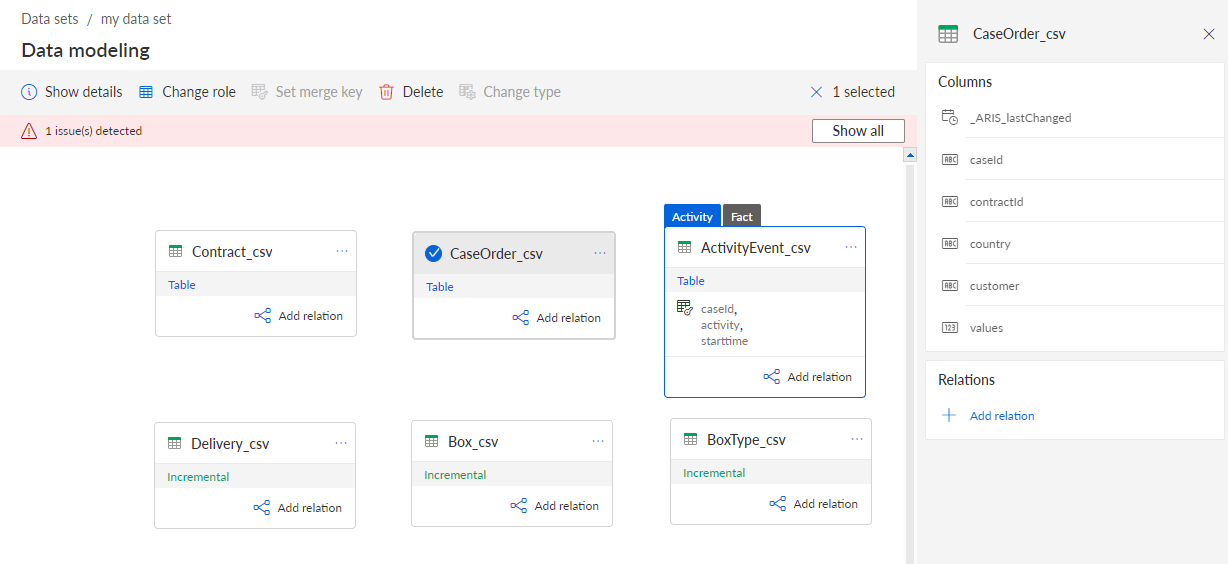
A data model can only contain one activity table, but several enhancement tables. You can link the activity table to an enhancement table and the enhancement table to another enhancement table. The enhancement table must include a column that can be used as a foreign key.
Click Data modeling in the Data set panel. The Data modeling section opens.
You can add one or more tables to the data model. By default, all tables added to the data model are first specified as enhancement tables. However, you can change the table role afterwards.
The enhancement tables are added to the data model.
You can now connect multiple data tables to enhance the process data.
Data model with one activity and five enhancement tables.