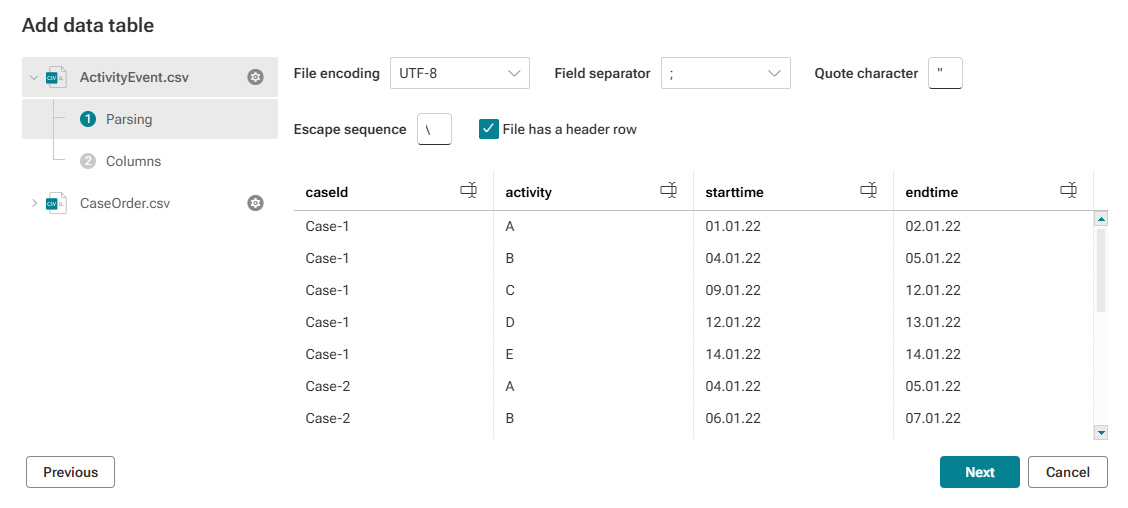
Configure data parsing
You can specify the source data settings. The settings are used to parse the source data into a data table.
ARIS Process Mining automatically identifies typical CSV configurations by analyzing the beginning of the file. You can change the parsing configuration if needed.
Click the following input fields, and specify your settings. For details, see the table below.
File encoding, Field separator, Quote character, and Escape sequence
Enable the File has a header row option if the CSV file has a line that can be used as a header. If you disable this option, all lines are used as table content, and a numbered header is added automatically.
You can edit the names of the columns. This is useful if the file does not have a header row. Click the
 Edit icon of a column, enter a column name and click Done.
Click Reload columns to get an updated data preview. This option is only available if you changed the settings.
Click Next.
You configured the data parsing and the page for configuring the columns opens.
CSV files
A CSV (Comma-Separated Values) file is a text file that uses a special character (a comma by default) to separate values. Each line of the file is a data record. Each record consists of one or more fields, separated by a field separator.
The following settings must be specified to parse the data of the CSV file.
Settings | Description |
|---|---|
File encoding | File encoding provides a code to correctly represent the character set used in the CSV file. By default, ARIS Process Mining uses the UTF-8 character encoding to handle character sets for all languages. UTF-8 is the most widely used encoding for Unicode characters. ARIS Process Mining does not support UTF-16. Select the encoding corresponding to the character set used in the CSV file. |
Field separator | Field separator (or delimiter) is a character that separates the characters in individual fields. The individual fields are ordered in columns during parsing. The most widely used separators are comma or semicolon. Select the separator used in the CSV file. |
Quote character | Quote characters prevent that certain characters are interpreted as separators, for example, commas in decimal numbers. The most widely used quote character is the double quote. Specify the quote character used in the CSV file. |
Escape sequence | Escape characters mark quotation marks as quotation marks embedded in a field. By default, the escape character, such as a backslash, is prefixed. Specify the escape character used in the CSV file. |
The example shows the data of the Parsing page of the ActivityEvent.csv file. The ActivityEvent.csv file is one of two uploaded files here.