Use the current date and time in calculation rules
You can use the current date and time to create time-related calculation rules, for example, to calculate the time span between a specific date and today's date or to check the status of a case in relation to the current date.
Use the NOW() operator to dynamically retrieve the current date and time at the time a calculation rule is executed.
CASE WHEN (AFTER("_ARIS.Case"."Case end time", ADD_DAYS(NOW(), -1))) THEN 'true' ELSE 'false'
The operation returns the state of the case as true if the end date of the case is more than one day away.
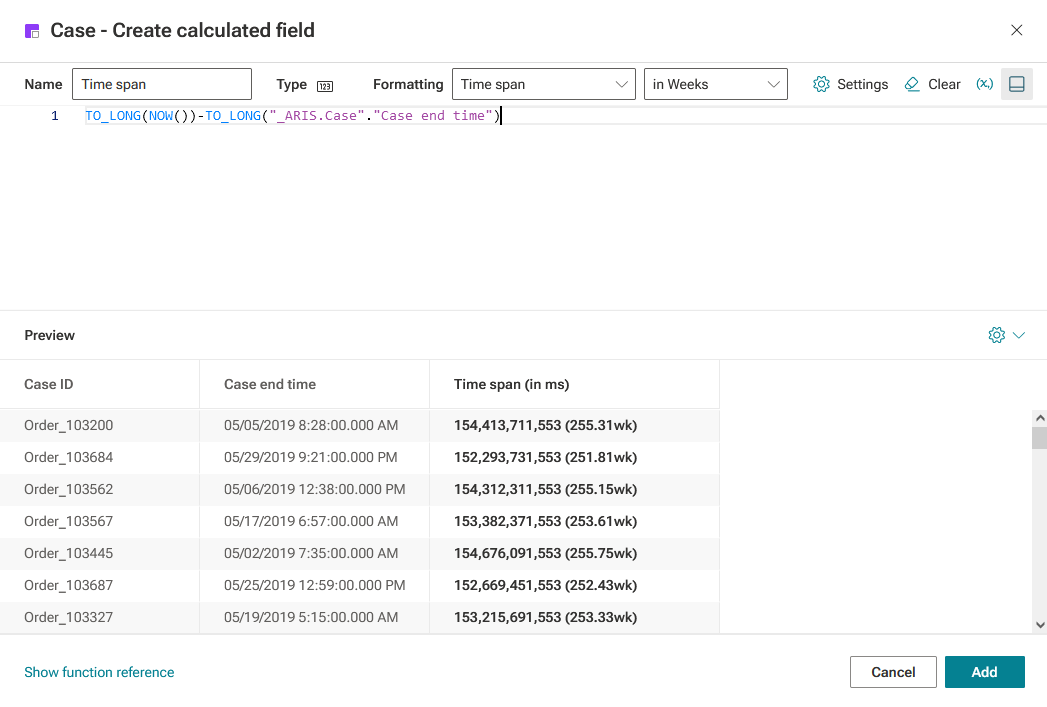
TO_LONG(NOW())-TO_LONG("_ARIS.Case"."Case end time")
The operation returns the time span between the end time of the case and now as a number in milliseconds.
Create or edit a calculated field using the code editor. The preview displays a column with the current date and time.
Define your calculation rule using the NOW() operator in the code editor.
Specify a field name, for example, Time span.
Enter a calculation rule, for example,
TO_LONG(NOW())-TO_LONG("_ARIS.Case"."Case end time")
You can specify another format in the Formatting drop-down menu. The specified format is also displayed in brackets () in the corresponding column.
For example, if you select Time span in weeks in the menu, the result is returned as a time span in weeks instead of the default number in milliseconds.
Example
Click Add.
You created a time-related calculation rule that uses the CODE() operator.