Create a JDBC extraction
Create an extraction to extract data from a JDBC database.
Prerequisites
A system integration for a JDBC database is created.
Process Extractor is installed and configured.
A connection for a JDBC database is created.
Click Extraction in the Data set panel. The Extractions section opens.
Click Add extraction. The Add SAP/JDBC extraction dialog opens.
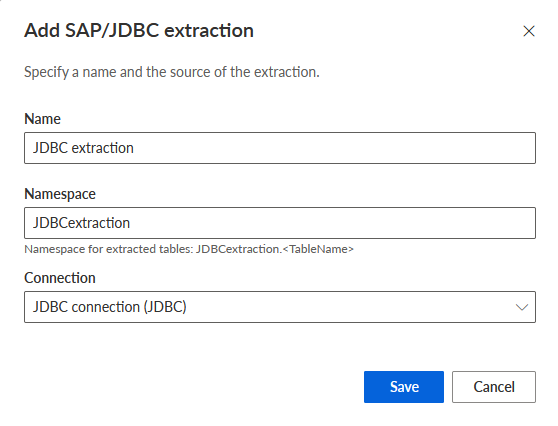
Add a name for the new JDBC extraction, for example, 'JDBC extraction'. The name must be unique.
You can specify a namespace for the extraction. By default, the extraction name and namespace are the same, but you can specify a different namespace. The namespace must be unique.
Note that "_ARIS" is not allowed as a namespace.
Note that the namespace specified in the extraction settings determines the logical location within the data set where extracted source tables are stored. This namespace is independent of the database schema name defined in the Process Extractor’s source system configuration file.
Select a JDBC connection in the Connection drop-down menu.
Click Add extraction.
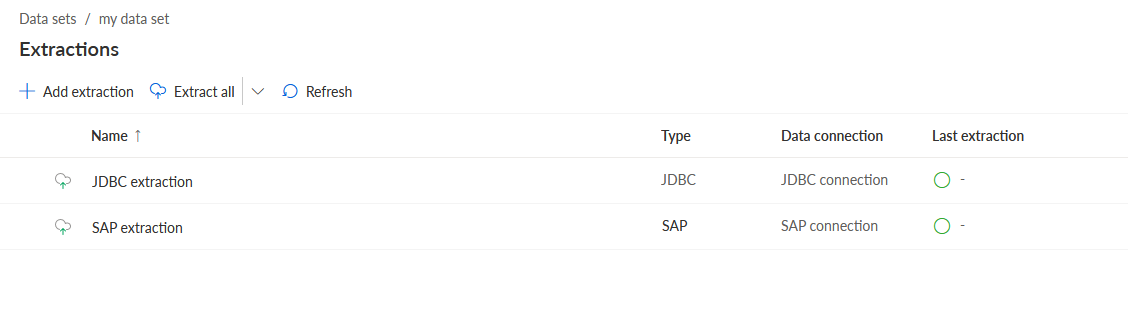
The JDBC extraction is created. The new extraction is available in the Extractions list.
You can now add the tables that you want to extract from the JDBC database.
Extractions list with a JDBC extraction created for the data set.