Create a transformation statement
The following transformation statement shows you how to create an SQL statement that creates an activity table based on a source table.
The statement reads the documents of purchase requisition items that are stored in the EBAN table extracted from the SAP source system. The created activity table contains the activities based on the purchase requisition items of the EBAN table.
The SQL statement specifies the table (from operation) and selects the columns (select statement) to create the activity table.
Enter select * operator in the first line of the SQL statement. The operation selects all columns of the specified source tables of the extraction.
Enter the from operator and select the PURCHASE_REQUISITION_ITEM.EBAN table in the Sources panel.
Place the cursor in the SQL statement.
Open the side panel.
Open the Sources panel.
Select the table.
The selected table is placed at the cursor position.
Click Preview. All data of the specified source table is read and displayed in a preview table. You can use the Preview option to check if the table content is correct.
If the transformation definition is not correct, an error message is displayed.
For an activity table with SAP data, you must specify the following values for the required columns: ACTIVITY for the name of the activity, START_TIME for the start time of the activity, ACTIVITY_ID for the unique identifier of the activity, and LINK_ID for the activity ID of the preceding activity.
Replace * by the line 'Create purchase requisition item' AS ACTIVITY' to define the literal 'Create purchase requisition item' as the activity name (column ACTIVITY) for each line of the table.
Click Preview to check the result table. The table just contains the ACTIVITY column with the Create purchase requisition item value for each row.
Add a comma and the line 'TO_TIMESTAMP(CONCAT(`BADAT`, '000000'), 'yyyyMMddHHmmss') AS START_TIME' to map the content of the BADAT source column as timestamp for the START_TIME column.
The '000000' literal is added to the value of the BADAT field because BADAT just contains a date, but a timestamp is needed as START_TIME. Additionally, you must specify the TO_TIMESTAMP transformation and the format of the timestamp to convert the Date string type to a timestamp.
Click Preview to check the result table. The table now contains the activity name and the start time of the activity.
Add a comma and the line 'CONCAT('EBAN-', `BANFN`, '-', `BNFPO`) AS ACTIVITY_ID to specify the mapping of the ACTIVTY_ID column.
You can use the Sources panel to add columns to the SQL statement.
Place the cursor in the SQL statement.
Open the side panel.
Open the Sources panel.
Select a column.
The selected column is placed at the cursor position.
A purchase requisition item can be identified by the BANFN and BNFPO fields from EBAN table. The fields are concatenated and prefixed with the name of the EBAN source table to prevent collisions with other IDs.
Click Preview to check the result table. The table now contains the ACTIVITY, START_TIME and ACTIVITY_ID columns.
Add a comma and the line 'null AS LINK_ID' to complete the statement. The LINK_ID column is the last of the required columns. You can set the column to null because the purchase requisition item is the first activity in the P2P process and instances of the purchase requisition item do not have a predecessor.
Click Preview to display the result of your transformation statement.
You have created the ACTIVITIES_PURCHASE_REQUISITION_ITEM transformation including the SQL statement for creating an activity table based on the EBAN table from the SAP source system.
The SQL statement looks like this.
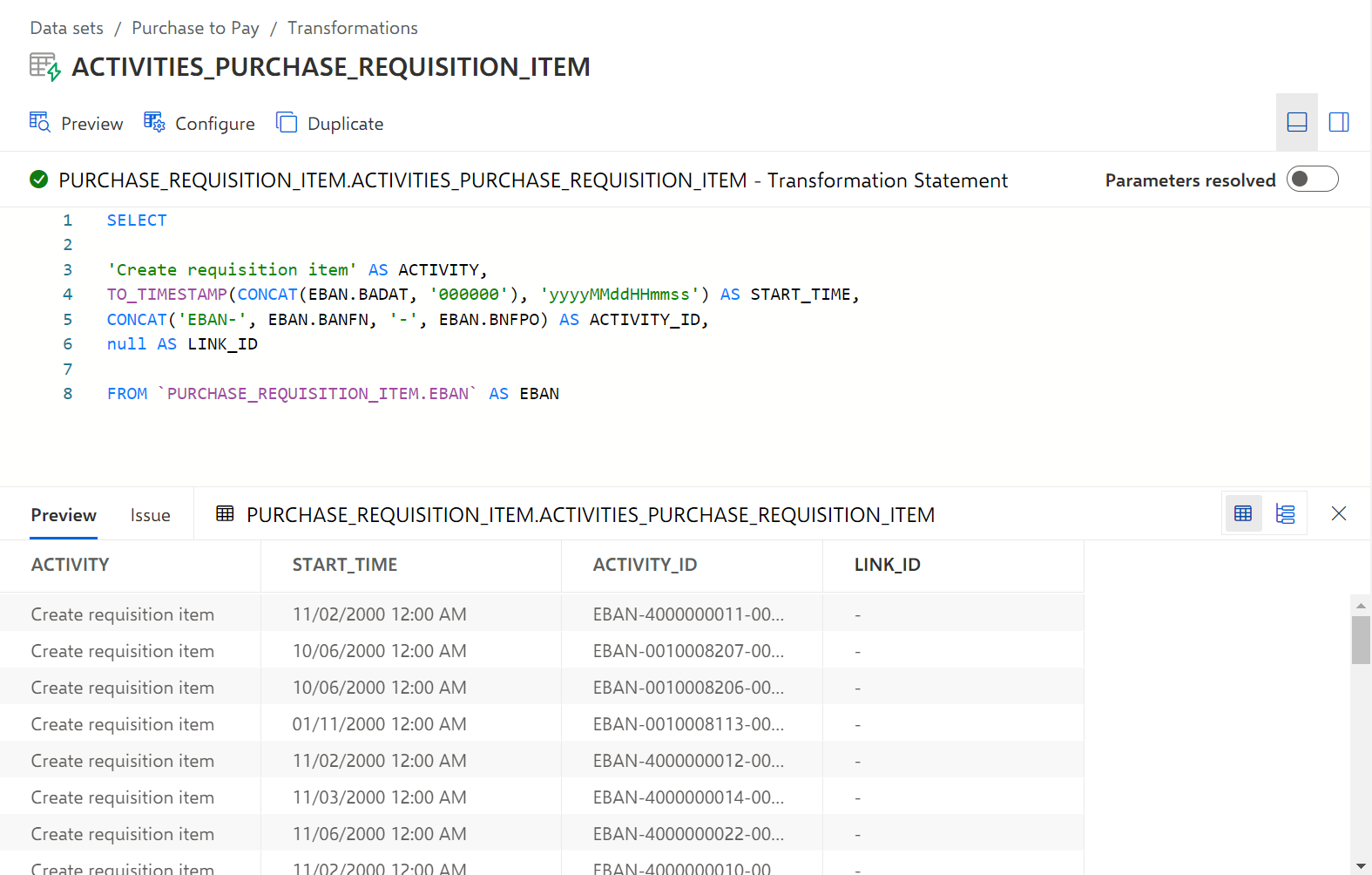
Here you can find the sample transformation statement as an SQL code snippet. You can use the snippet to follow the described example: