General procedure
This chapter summarizes the basic steps you need to take to successfully analyze your data and processes in ARIS Process Mining.
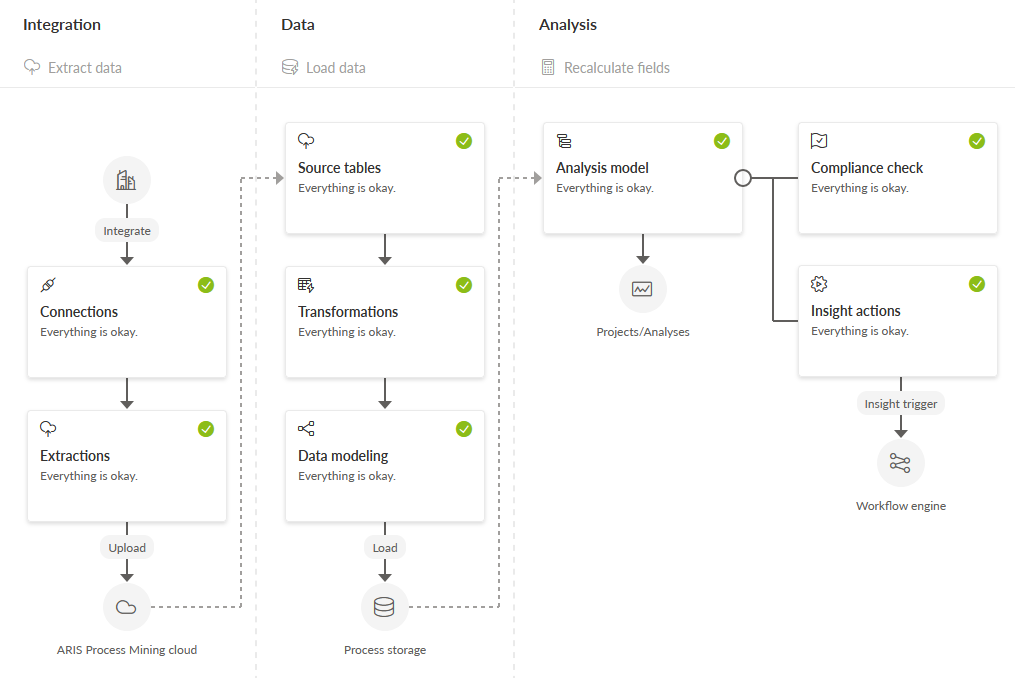
The basis for your analyses is a data set. A data sets contains all the data you need to perform your analyses. Before you can analyze the data, you must add the source data to ARIS Process Mining and configure it according to your requirements. ARIS Process Mining processes data in the form of tables that must conform to a specific table schema. Depending on the data source you want to use, you will need to perform various steps to convert the source data into the required schema.
Prerequisite
You created a data set to store and manage the data to analyze.
Add your source data to ARIS Process Mining
Upload CSV files as source data.
The easiest way to use source data is to upload CSV files that have already been extracted from a data source.
Extract data from external source systems.
If you want to extract data directly to ARIS Process Mining from an external data source or a database system, such as an SAP source system or a JDBC database, you must perform the following steps.
Ingest data using a public API
You can use a public data ingestion API to obtain data from any data source. You create and send HTTP requests to use the API.
The uploaded data files or extracted source data is converted into source tables that ARIS Process Mining can further process.
Transform the source tables
You can use data transformations, for example, to transform data within a table, to filter data from a table, or to join different source tables. Some source data requires a data transformation in order to process them further, for example, if the extracted tables do not comply with the required table schema.
Create a data model
You must configure a consistent data model using the created source tables and transformation views. The data model shows how the tables are connected.
Load data into process storage
You must load the data based on the data model into the process storage. This data is used to create an analysis model. The analysis model provides the final data structure for all your analyses.
Configure the analysis model
You can configure the analysis model, for example, you can add calculated fields.
Perform analyses
After you created and configured the analysis model, you can create and run your analytics, such as compliance check, insight actions, or many other process analyses.
The diagram shows the basic procedural steps you must perform in order to analyze your data and processes in ARIS Process Mining.