Use the code editor
ARIS Process Mining provides a code editor to create scripted definitions. The code editor has an integrated syntax checker and an auto-complete capability. When you start typing, the editor displays suggestions of possible operators and operands.
In scripted definitions, you can use variables at any place in the code. Variables work as placeholders and will be replaced before evaluating the code. That means variables are not only literal values, but can contain parts of the code.
Depending on the ARIS Process Mining version you are using, different options are available in the editor.
To display all supported operators and operands, click in the first line of the editor and press Ctrl + Space.
Click in the first line of the editor and press Ctrl+ Space. A box with the available elements opens.
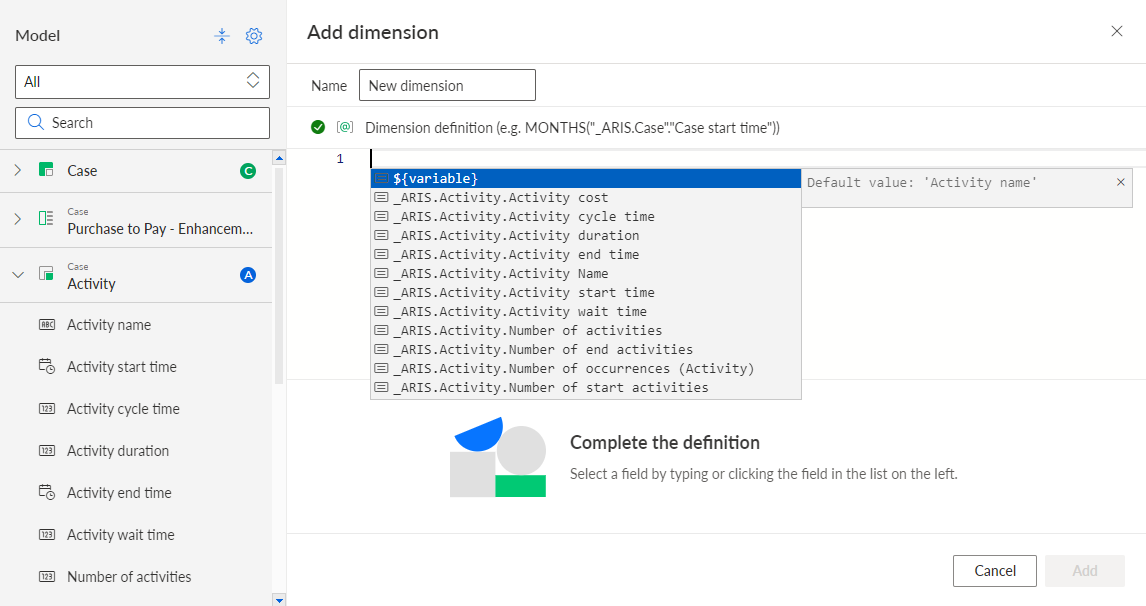
When you start typing, the list in the box is filtered for the available column fields, variables, or aggregations.
Select the required elements, such as fields and operators, in the box. You can also enter the code directly in the editor field.
Define the script using the relevant operators and operands for scripted definition.
Click Apply.
You created a scripted definition.