Create a work time calendar
You can create customized work time calendars of different types, such as weekday, workday, or factory calendars.
Click Work time in the data set panel. The Work time section opens.
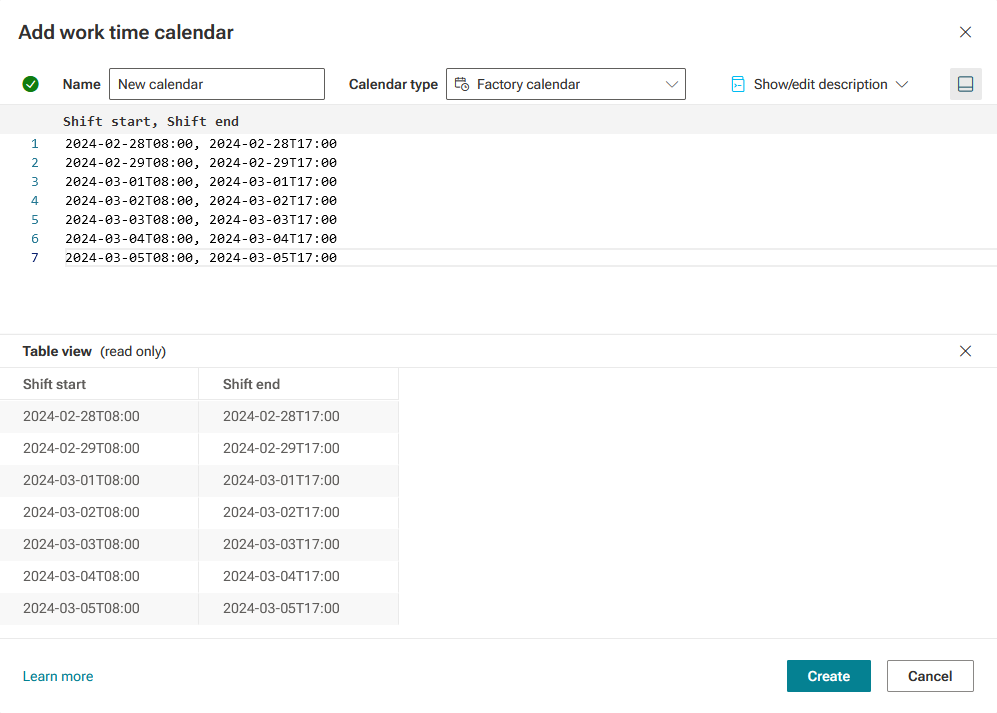
Click New work time calendar. The Add work time calendar dialog opens.
Enter a unique calendar name in the corresponding input field. The name is used to refer to a calendar by the calculation operators.
Select a calendar type in the corresponding drop-down menu.
To add a description, click Show description and enter a text in the corresponding input field.
Enter the calendar data in the input field depending on the calendar type.
To display or hide a preview of the calendar, click the
 Preview icon. The preview is displayed by default.
Click Create.
You created a calendar.
You can use the calendar as an input for time-related calculations.
Example