Data extraction process
The data extraction process is illustrated below using SAP as the data source. The process works similarly for SAP systems and JDBC databases.
Process data (events) is extracted and transferred from the SAP source systems to ARIS Process Mining Cloud where it is stored for further processing.
For this purpose, Process Extractor must be installed as a service in your system environment, and it must have access to the SAP systems from which data is to be extracted. Once Process Extractor is started, it queries the process mining cloud at cyclical intervals to determine whether extraction tasks are available for it. If this is the case, these extraction tasks are downloaded and executed by Process Extractor. The extraction is done in chunks. These chunks are temporarily stored as parquet files into a sub folder of the <Process Extractor>\data directory and then transferred to ARIS Process Mining Cloud.
The data extraction from the SAP system is performed following an extraction description. This extraction description is defined by the customer based on a visual data model description in ARIS Process Mining. This description defines the data tables and data columns to be extracted from the respective SAP systems.
Schematic representation of the data extraction process
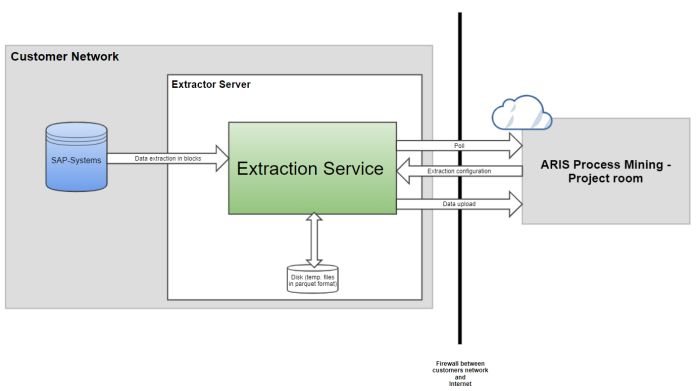
When Process Extractor service is started, the service connects to ARIS Process Mining with the configured client credentials.
If ARIS Process Mining could not be reached:
Process Extractor tries to reconnect in a loop at a fixed time interval.
If the connection fails because of wrong credentials:
An error message is logged and the service continues running. This is necessary because otherwise the CLI tool can not connect to update the configuration.
If the connection is successful:
Process Extractor logs on to the configured project room.
ARIS Process Mining reads the table meta data (table names and description) of the SAP system if required.
If the registration is completed successfully, the Process Extractor service starts polling for new jobs.
When ARIS Process Mining sends an extraction configuration, Process Extractor schedules it.
Depending on the configuration, one or multiple RFC connections are used for data extraction from SAP system.
Data extraction is done with the configured block size.
Every extracted data block is written to a file located in a subdirectory of the data folder. The files are uploaded one after the other.
If the upload of a file is interrupted, Process Extractor will try to upload the file again until the configured upload time is reached.
If a scheduled data extraction is canceled either by ARIS Process Mining or, for example, by network errors, ARIS Process Mining cleans up the temporary data files.
Data extraction
When a data extraction is canceled or the connection between SAP and the Extractor is lost, it could be that entries remain in RFCs temp table /SOFWAG/INDX_V2. The remaining data is automatically removed after a few days during a data extraction.