Getting started
This section shows you how to extract source data from an SAP system and how to configure and analyze the extracted data in ARIS Process Mining.
The data extraction process is shown based on a simple example.
The example is based on the Procure to Pay (p2p) process in the SAP system. For this example, we extract only the two document items Purchase requisition item and Purchase order item from the SAP source system and create the corresponding process steps in ARIS Process Mining. We connect these two steps using a predecessor reference from Purchase order item to Purchase requisition item.
This example was built on an SAP system with IDES data. You can reproduce this with your own SAP system if it contains IDES data.
You can create your own project that contains a data set named Purchase to Pay, which you can use to follow the example.
To extract data from an SAP source system, you must perform the following steps.
In your system environment
In ARIS Process Mining
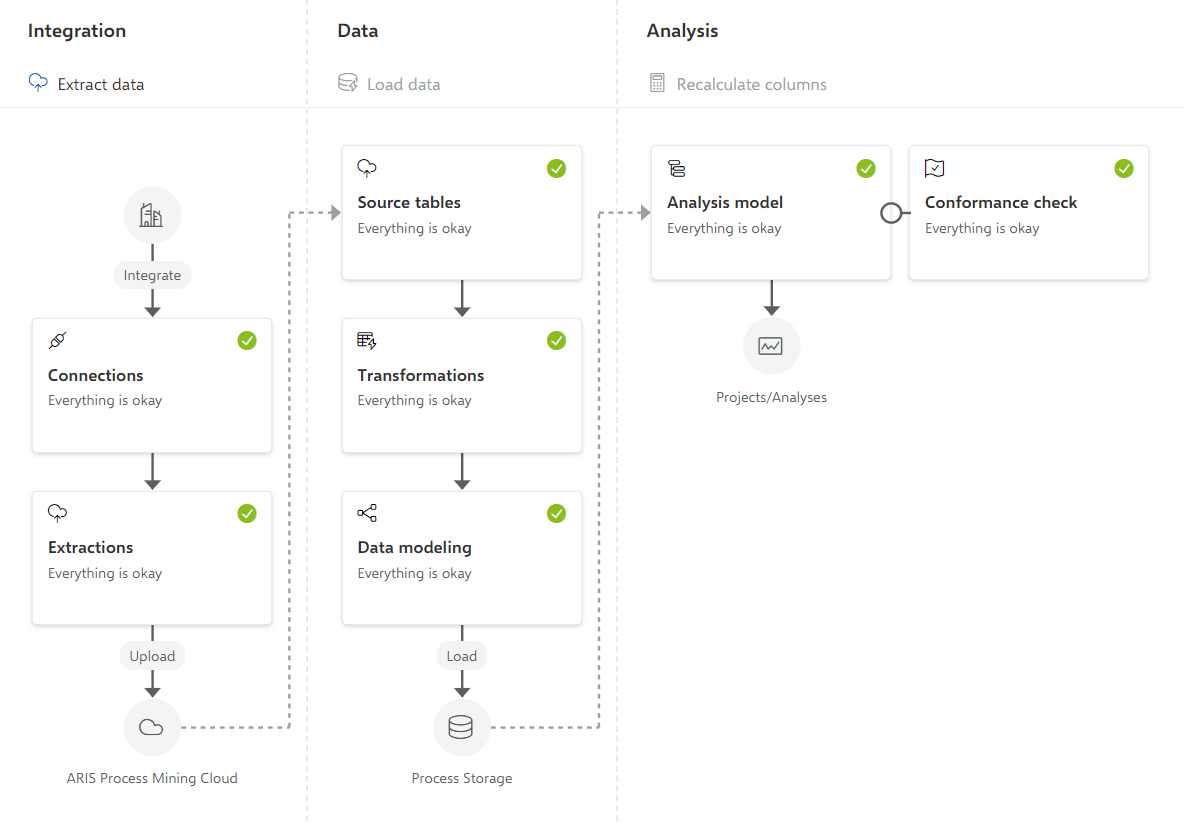
The following figure gives an overview of the data processing in ARIS Process Mining. The data processing starts with the system integration and connection of the data source system, followed by the extraction and transformation of the source data, to finally analyze the process data in ARIS Process Mining using apps.