Relate activity and enhancement tables
You need to link the activity table to the enhancement tables in the data model by relating them. Enhancement tables must contain appropriate data, including specific columns that you can use to relate the tables. These columns are called foreign keys.
Note that duplicate foreign keys in the enhancement tables are not supported. The loading process will not fail, but it cannot be guaranteed that the correct column is taken as foreign key.
A data model can only contain one activity table, but several enhancement tables. You can relate the activity table to one or more enhancement tables and an enhancement table to another enhancement table.
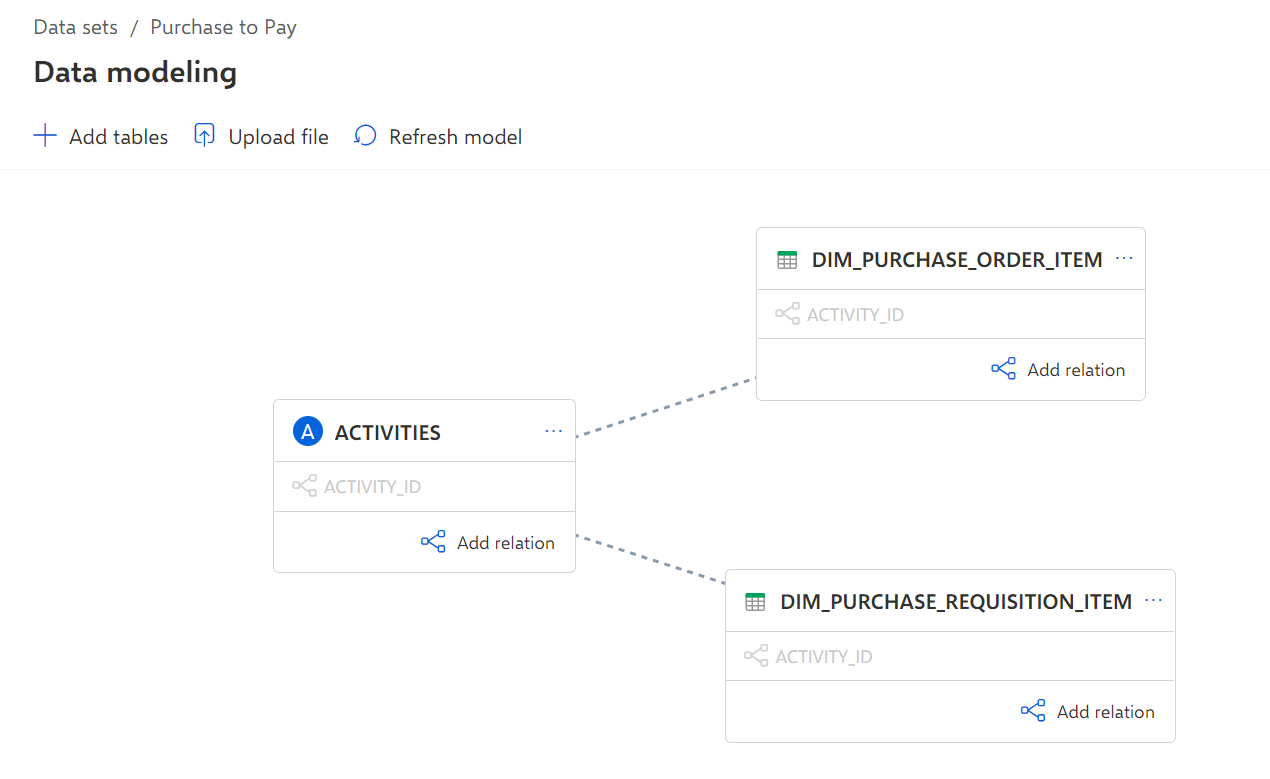
You can use the ACTIVITY_ID column, which is included in each table, to link the activity table to both enhancement tables.
Click Add relation on the ACTIVITIES table.
For all other tables on the Data modeling page, a Connect with table button is displayed.
Click the Connect with table button on the desired enhancement table, for example, the DIM_PURCHASE_REQUISITION_ITEM table. The Edit relation dialog opens.
Select a column as foreign key from each table to connect both tables, for example, the ACTIVITY_ID column. The selected columns are displayed at the top of the column lists, connected with a dotted line.
Click Confirm.
Both data tables are now related, and the selected foreign key is displayed in the corresponding data tables.
Relate the ACTIVITIES table to the DIM_PURCHASE_ORDER_ITEM table, in the same way.
The activity table is now related with both enhancement tables using the ACTIVITY_ID column as foreign key. You have configured the data model with all relevant data for your process analyses.
Example
You can now load the new data and data structure into the process storage of the data set.