Visual operators and operands
The visual editor provides the following operators and operands.
List of operands supported by the visual editor:
Operands | Subtype | Syntax | Description |
Field/field name | Field and field names | ||
Constant | Boolean |  | Boolean value: true or false |
Date |  | A field the value of which is a defined date constant. dateConstant (Date): Date constant | |
Number (Long/Double) |  | A field the value of which is a defined long or double constant. numberConstant (Long/Double): The value is of the Long type by default. If a decimal separator is included, the type changes automatically to Double. | |
Text |  | A field the value of which is a defined text constant. textConstant (Text): Text constant | |
NULL (Number) |  | A number type constant the value of which is NULL. The value NULL represents the intentional absence of a (field) value. | |
NULL (Text) |  | A string type constant the value of which is NULL. The value NULL represents the intentional absence of a (field) value. | |
NULL (Date) |  | A date type constant the value of which is NULL. The value NULL represents the intentional absence of a (field) value. |
List of operators supported by the visual editor:
Operators | Subtype | Syntax | Description |
Math | Addition | 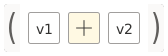 | Addition of two numbers. v1(Number): Term v2(Number): Term |
Subtraction | 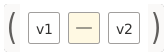 | Subtraction of two numbers. v1(Number): Term v2(Number): Term | |
Division | 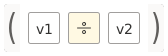 | Division of two numbers. v1(Number): Term v2(Number): Term | |
Multiplication | 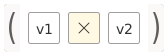 | Multiplication of two numbers. v1(Number): Term v2(Number): Term | |
Minimum | 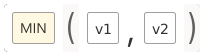 | Returns the smaller of two number values. v1(Number): Term v2(Number): Term | |
Maximum | 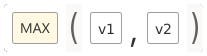 | Returns the greater of two number values. v1(Number): Term v2(Number): Term | |
Absolute | 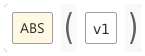 | Returns the absolute value of a numerical value. v1 (Number): The term the absolute value of which is to be determined. | |
Round | 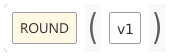 | Returns the integer closest to the given value. v1 (Number): A floating-point value to be rounded to an integer. | |
Round up | 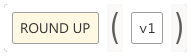 | Returns the smallest double value that is greater than or equal to the argument and equal to a mathematical integer. v1 (Number): A floating-point value to be rounded up to an integer. | |
Round down | 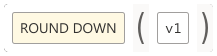 | Returns the largest double value that is less than or equal to the argument and equal to a mathematical integer. v1 (Number): A floating-point value to be rounded down to an integer. | |
Comparison | Logic operator | 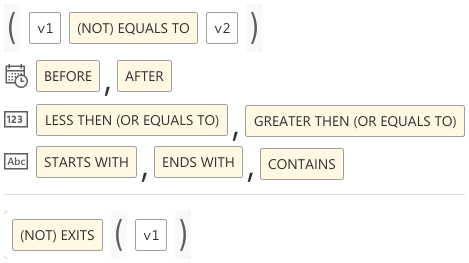 | Returns a Boolean value: true or false. Includes: (Not) Equals to, Before, After, Less then (or equals to), Greater then (or equals to), Starts with, Ends with, Contains, and (Not) Exists |
Activity value | Average (AVG) |  | Returns the average of the values in an activity field. Ignores null values. Aggregation type: AVG/Others activityField (Number): Activity field to be aggregated |
Concat all |  | Returns a single text value that is the result of the concatenation of all text values in an activity field. Aggregation type: CONCAT ALL/Others activityField (Number): Activity field to be aggregated | |
Count |  | Returns the number of values found in an activity field. Aggregation type: COUNT/Others activityField (Number): Activity field to be aggregated | |
Distinct |  | Returns the number of distinct values found in an activity field. Aggregation type: DISTINCT/Others activityField (Number): Activity field to be aggregated | |
First |  | Returns the first value in an activity field with the order being defined by the case flow. Aggregation type: FIRST/Others activityField (Any): Activity field to be aggregated | |
Last |  | Returns the last value in an activity field with the order being defined by the case flow. Aggregation type: LAST/Others activityField (Any): Activity field to be aggregated | |
Maximum (MAX) |  | Returns the maximum value in an activity field. Aggregation type: MAX/Others activityField (Number): Activity field to be aggregated | |
Median |  | Returns the median value or an interpolated value that would be the median value once the values are sorted in an activity field. Aggregation type: MEDIAN/Others activityField (Number): Activity field to be aggregated | |
Minimum (MIN) |  | Returns the minimum value in an activity field. Aggregation type: MIN/Others\nactivityField (Number): Activity field to be aggregated | |
Standard deviation (STDDEV) |  | Returns the statistical standard deviation of all values in an activity field. Aggregation type: STDDEV/Others activityField (Number): Activity field to be aggregated | |
Sum |  | Returns the sum of all values in an actvity field. Ignores null values. Aggregation type: SUM/Others activityField (Number): Activity field to be aggregated | |
Object value | Any |  | Returns the first value of the object field with the order being defined by the case flow. Aggregation type: FIRST/Others objectField (Any): Object field to be aggregated |
Average (AVG) |  | Returns the average value of the object field. Ignores null values. Aggregation type: AVG/Others objectField (Number): Object field to be aggregated | |
COUNT |  | Returns the number of values found in the object field. Aggregation type: COUNT/Others objectField (Number): Object field to be aggregated | |
Distinct |  | Returns the number of distinct values found in the object field. Aggregation type: DISTINCT/Others objectField (Number): Object field to be aggregated | |
Maximum (MAX) |  | Returns the maximum value of the object field. Aggregation type: MAX/Others objectField (Number): Object field to be aggregated | |
Median |  | Returns the median value or an interpolated value that would be the median value once the values are sorted in the object field. Aggregation type: MEDIAN/Others objectField (Number): Object field to be aggregated | |
Minimum (MIN) |  | Returns the minimum value of the object field. Aggregation type: MIN/Others objectField (Number): Object field to be aggregated | |
Standard deviation |  | Returns the statistical standard deviation of all values of the object field. Aggregation type: STDDEV/Others objectField (Number): Object field to be aggregated | |
Sum |  | Returns the sum of all values of the object field. Ignores null values. Aggregation type: SUM/Others objectField (Number): Object field to be aggregated | |
Date | Parse |  | Parses a given text to produce a date. Select a value (v1) of the Text type to be parsed and specify the pattern of the The parsing of date strings is based on the Java parser. For more details, please refer to the Java documentation page. |
Add | 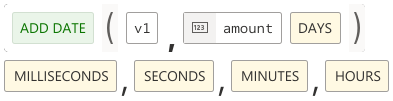 | Adds or subtracts the specified amount of time to the given date, based on calendar rules. v1 (Date): Input date amount (Number): The date or time to be added/subtracted. | |
Text | Concatenate | 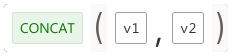 | Concatenates the specified text vX+1 to the end of the text vX. vX (Text): The text to which you want to concatenate vX+1 (Text): The text that is concatenated to the end. |
Find | 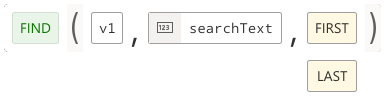 | Returns the index within the given text of the first occurrence of the substring specified. v1 (Text): Input text searchText (Text): The text to search for. Find mode: first/last | |
Substring |  | Returns the part of the text from the start index to the specified length or to the end of the string. v1 (Text): Input text startIndex (Number): The beginning index, inclusive length [optional] (Number): The number of characters to return (optional) | |
Replace |  | Replaces each (or the first/last) subtext of the given text that matches the literal target sequence with the specified literal replacement sequence. v1 (Text): Input text searchFor (Text): The text to be replaced replaceWith (Text): The replacement text Replace mode: all/first/last | |
Length | 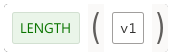 | Returns the length of the specified text. v1 (Text): Input text | |
Convert | 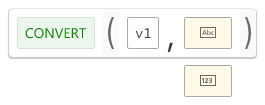 | Converts the data type of a given value into a defined data type. Select a value (v1) to be converted and specify the target data type, for example, Text, Double, or Long. See also table below. | |
IF-THEN-ELSE | 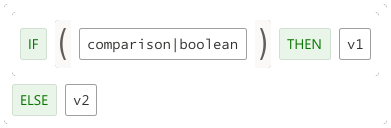 | The IF-THEN-ELSE operator is a basic calculation flow operator. It tells the calculation to use a specified value only if a particular comparison/Boolean evaluates to true. If none of the comparisons/Booleans evaluate to true, the Else value is used. The IF-THEN-ELSE statement provides a secondary path of execution if an "if" clause evaluates to false. | |
Match | Match case |  | Match a case by describing a selection. Returns 'true' if the checked case matches the given selection, otherwise 'false'. The boolean operators MATCH_CASE allows the use of selections. In value calculations it can be used to check for each case whether they match or not. You must embed the selection statements as operands in these operators. |
Match activity |  | Match an activity by describing a selection. Returns 'true' if the checked activity matches the given selection, otherwise 'false'. The boolean operators MATCH_ACTIVITY allows the use of selections. In value calculations it can be used to check for each activity whether they match or not. You must embed the selection statements as operands in these operators. |

Convert operator
Please note the following.
From/To | Text | Time | Long | Double |
|---|---|---|---|---|
Time | ISO 8601 format | X | Number of milliseconds since January 1, 1970, 00:00:00 GMT | Number of milliseconds since January 1, 1970, 00:00:00 GMT |
Text | X | X | The format is limited. (See note below.) | The format is limited. (See note below.) |
Long | Example 10 | Input must be number of milliseconds since January 1, 1970, 00:00:00 GMT | X | A conversion of very large (> 2^53) or very small (< - 2^53) longs into double may loose precision in the least significant digits. |
Double | Example 10.5 | Input must be number of milliseconds since January 1, 1970, 00:00:00 GMT | The fractional part will be truncated, for example, 1.99 is converted into 1. Rounding can be applied on the double beforehand through the existing rounding operators. | X |
For timestamps, the input format must conform to the ISO 8601 format produced by the product. For individual time formats you can still use the existing Parse date operator.
For numbers, no grouping character is used and the decimal point is the character '.' , for example, 10.5.