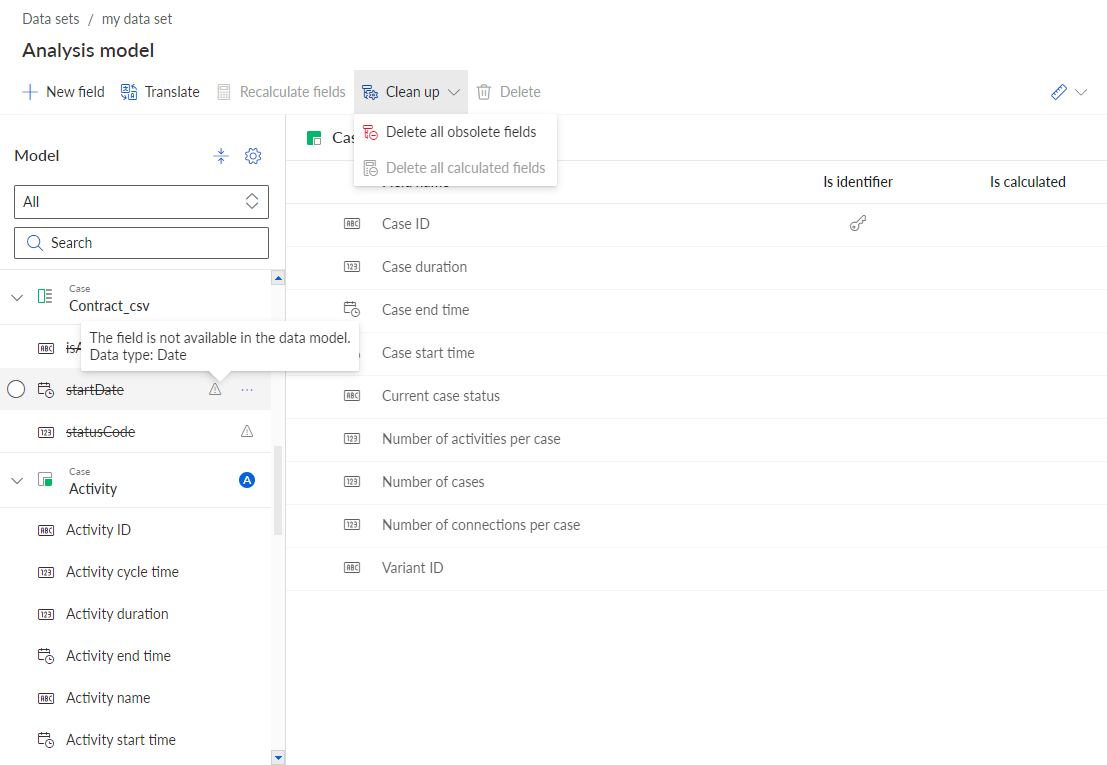
Delete obsolete fields
You can delete fields from the analysis model that are no longer available in the data model because the schema of the data table has been changed, for example, fields in the data table have been renamed or deleted. In the analysis model, an obsolete field is indicated by an icon ( ) in the field list, a strikethrough to the name, and a tool tip. A field in the analysis model is indicated as obsolete if the data model did not contain the column that the field referred to during the most recent data load. Some cases in the process storage that are already loaded can still contain data for the obsolete field.
When you change the table schema, you can lose the reference of a field in the analysis to the corresponding field in the data table. As a result, the field is no longer considered during the data load. Obsolete fields (including the data) remain in the process storage until they are deleted.
An alternative to deleting the field is to change the data model reference of the field to another column and/or table in the data model. With the new reference, the field can receive data again with the next data load.
Click Analysis model in the Data set panel. The Analysis model section opens.
In the analysis model header, click Manage model > Delete obsolete fields. The option is only available if there are obsolete fields in the analysis model.
Click Delete.
All obsolete fields are deleted.